-

-
Location:
1922 Mentor Ave, Painesville Twp.
Location:
1922 Mentor Ave, Painesville Twp.
Computer optimization service can transform a sluggish, unresponsive machine into a fast, reliable workhorse. If your PC takes forever to start up, freezes randomly, or feels painfully slow, professional optimization addresses the root causes—from junkware and bloated startup programs to outdated drivers and fragmented hard drives.
What a Computer Optimization Service Typically Includes:
Research shows that optimization technology like Process Lasso’s ProBalance can make an extreme difference—Chrome loading in under 1 second with optimization enabled versus 30-40 seconds without it. Regular maintenance ensures your computer stays fast, stable, and reliable, reducing time spent on frustrating fixes.
As Jay Baruffa, President of Tech Dynamix and owner of Little Mountain Phone & Computer Repair, I’ve spent years helping families and businesses extend the life of their devices through professional computer optimization service. Our team combines diagnostic expertise with hands-on repair skills to deliver same-day results that keep you productive.
In today’s digital world, a slow computer isn’t just an annoyance; it’s a productivity killer. Whether you’re working from home, running a business in Lake County, Ohio, or simply trying to enjoy your favorite online content, your computer’s performance directly impacts your efficiency and overall experience. That’s where a professional computer optimization service becomes invaluable.
At Little Mountain Phone & Computer Repair, we understand that you rely on your devices to perform seamlessly. Our goal is to ensure your system stability and reliability, changing your frustrating, lagging machine into a smooth, responsive powerhouse. Think of it like a regular tune-up for your car – it prevents major breakdowns and keeps everything running efficiently.
Why is this so important?
Consider the impact of advanced process management, like Process Lasso’s ProBalance technology. This smart tool monitors running processes and intelligently adjusts the priority of resource hogs. As our research shows, in extreme examples, an application like Chrome could load in under 1 second with ProBalance enabled, compared to a staggering 30-40 seconds with it disabled. This demonstrates the power of intelligent resource management in maintaining application responsiveness, even under heavy load. A professional optimization service applies similar principles to your entire system, not just individual processes.
We offer comprehensive Computer repair services across Painesville, Mentor, Chardon, and surrounding areas in Ohio, focusing on proactive solutions that keep your computer performing at its best. Regular maintenance ensures your computer stays fast, stable, and reliable, reducing the time spent on fixes and frustrating downtime.
Is your computer painfully slow? Does it take forever for your PC or Mac to start up? Does it constantly stop responding, leaving you staring at a frozen screen? These are not just minor glitches; they are clear indicators that your device is crying out for a professional computer optimization service.
Over time, even the most powerful machines can start to drag. Why does this happen? Our computers accumulate digital clutter and face software inefficiencies that gradually degrade performance. Here are the common signs we often see in computers brought to our shops in Ohio:
If you recognize any of these symptoms, especially on your Laptop repair, it’s a strong indication that it’s time to consider a professional tune-up. We’re here to help restore your computer to its former glory.
Here’s a quick comparison to help you identify if your computer is suffering:
| Symptom | Slow/Unoptimized PC | Optimized PC |
|---|---|---|
| Startup Time | Several minutes, often with delays | Seconds, ready to use almost instantly |
| Application Launch | Noticeable wait times, sometimes crashes | Opens quickly and smoothly |
| General Responsiveness | Lagging mouse, delayed typing, slow navigation | Immediate response to commands |
| Freezes/Crashes | Frequent, leading to lost work and frustration | Rare or non-existent |
| Hard Drive Capacity | Often above 90%, system warnings | Ample free space, organized files |
| Junkware/Adware | Unwanted toolbars, pop-ups, background processes | Clean system, no intrusive software |
| Fan Noise | Constantly loud, even when idle | Quiet during normal use, increases only under load |
| Web Browsing | Slow page loading, unresponsive tabs | Fast, fluid, and seamless browsing |
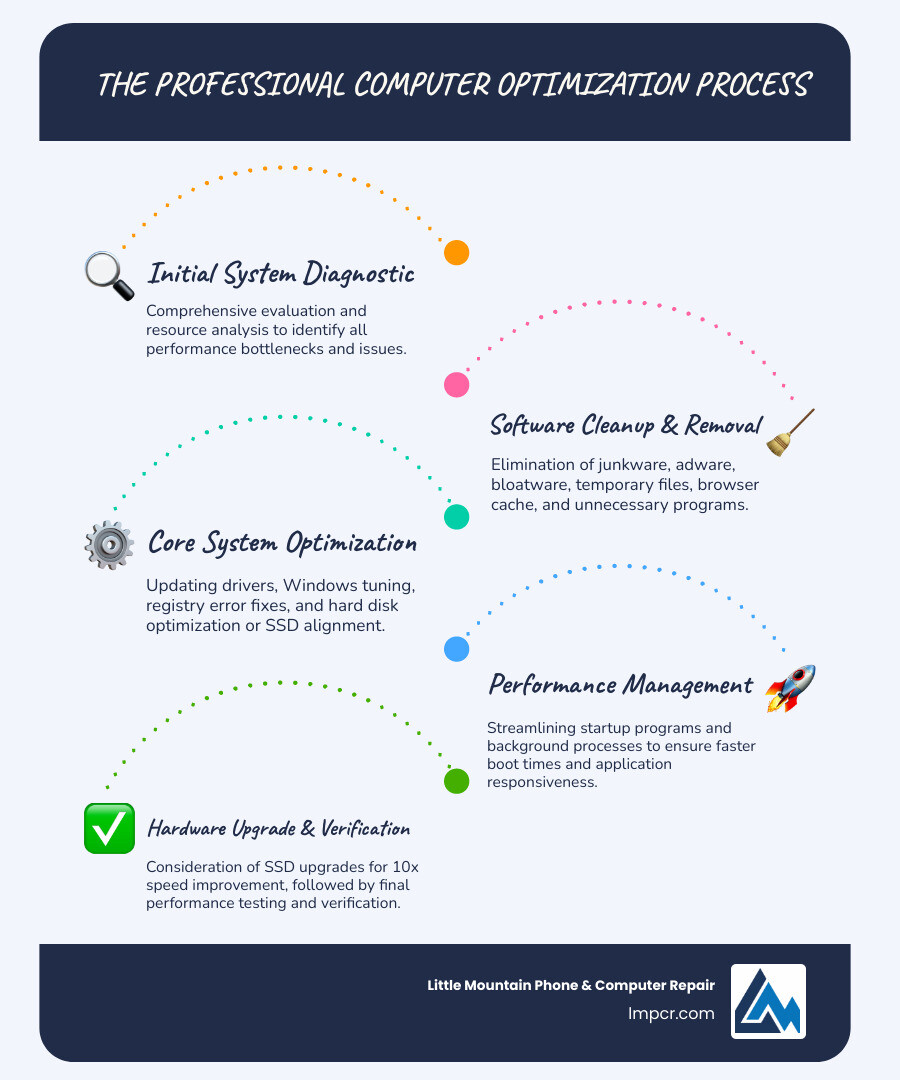
When you bring your computer to Little Mountain Phone & Computer Repair for a computer optimization service, you’re not just getting a quick fix. You’re investing in a comprehensive process designed to revitalize your machine from the inside out. Our expert technicians, with over 20 years of experience, follow a meticulous process to ensure your computer performs at its peak.
Our optimization process typically begins with a thorough evaluation and analysis of your system’s resources. We identify bottlenecks, diagnose underlying issues, and pinpoint areas for improvement. This initial assessment helps us tailor the optimization to your specific needs.
Here’s a breakdown of what we typically include:
We pride ourselves on offering comprehensive PC Repair services that go beyond just cleaning. Our team ensures that every aspect of your computer’s software environment is optimized for speed, stability, and security.
Sometimes, software optimization alone isn’t enough to open up your computer’s full potential. That’s when we look at hardware upgrades and essential physical cleaning.
One of the most impactful upgrades we recommend is replacing older mechanical hard drives (HDDs) with Solid-State Drives (SSDs). As our research confirms, SSDs can make your computer run at least 10 times faster than traditional HDDs. The difference in boot times, application loading, and file transfers is truly transformative. We can seamlessly transfer your existing data to the new SSD, ensuring no loss of your precious files, and if needed, assist with Data Recovery from your old drive.
Beyond upgrades, physical cleaning is crucial. Over time, dust and debris accumulate inside your computer’s case, especially around fans and heatsinks. This buildup acts as an insulator, trapping heat and causing components to overheat. Overheating leads to thermal throttling, where your CPU and GPU intentionally slow down to prevent damage, resulting in significant performance drops. Our service includes:
These hardware improvements and physical cleaning steps are fundamental to not only improving current performance but also ensuring hardware longevity and preventing future issues.
While our primary focus for local customers in Painesville, Mentor, and surrounding Ohio communities is on optimizing individual PCs and Macs, it’s worth understanding that the principles of optimization extend to far more complex systems. Even at the enterprise level, with cloud services, the core idea remains the same: efficient resource allocation to reduce costs and improve performance.
For instance, consider services like AWS Compute Optimizer or Google Cloud Optimization AI. These powerful tools use machine learning to analyze vast amounts of data—historical utilization metrics, workload patterns, and resource configurations—to recommend optimal resource settings. AWS Compute Optimizer, for example, identifies under-provisioned resources that cause performance issues and over-provisioned resources that lead to unnecessary costs. Similarly, Google Cloud’s Optimization AI tackles operational optimization problems at massive scale, like optimizing fleet routing for logistics companies.
How does this relate to your personal computer? The underlying philosophy is analogous. Just as these cloud services analyze CPU utilization, memory usage, and I/O patterns to make “rightsizing recommendations,” a professional computer optimization service for your PC or Mac performs a similar, albeit localized, analysis.
By applying these principles, whether for a single computer in Chardon, Ohio, or a global cloud infrastructure, the goal is always to maximize efficiency, reduce waste, and deliver the best possible performance. We bring that same level of analytical rigor and expertise to your desktop or laptop.
Investing in a professional computer optimization service isn’t just about solving an immediate problem; it’s about securing long-term benefits that extend the life and improve the performance of your device. Think of it as preventative care for your digital companion.
At Little Mountain Phone & Computer Repair, we offer comprehensive Services for all your Computer needs, designed to keep your technology running smoothly. We believe in empowering our clients across Painesville, Mentor-on-the-Lake, and all of Lake County, Ohio, with reliable, long-lasting solutions.
We get a lot of questions about computer optimization service, and that’s great! It shows you care about your technology. Here are some of the most common inquiries we receive from our valued customers in Ohio:
The cost of a computer optimization service can vary depending on the depth of the service, the specific issues your computer is facing, and whether any hardware upgrades (like an SSD installation) are included. At Little Mountain Phone & Computer Repair, we believe in transparent pricing. We’ll provide a clear diagnosis and a detailed quote before we begin any work. While it’s an investment, consider it an investment in your productivity and the lifespan of your device, often saving you money compared to replacing a sluggish computer or dealing with more severe, costly issues down the line. We aim to provide comprehensive solutions that offer excellent value.
For most users, we recommend a professional computer optimization service at least once a year. However, if you’re a heavy user—someone who frequently installs and uninstalls software, downloads large files, or engages in resource-intensive tasks like gaming or video editing—you might benefit from optimization every six months. Regular home maintenance, like keeping your operating system and antivirus software updated, deleting temporary files, and managing your browser cache, can help extend the time between professional services. Think of it like getting your car’s oil changed; it’s a routine task that keeps everything running smoothly.
Absolutely not! A professional computer optimization service should never delete your personal files. Our primary goal is to improve your computer’s performance, not to erase your precious memories or important documents. Our process focuses on cleaning system files, removing unnecessary programs, optimizing settings, and performing hardware improvements. Before we begin any significant work, especially if it involves system reinstallation or hardware replacement, we always ensure your data is backed up. We understand how important your data is, and safeguarding it is our top priority. If you have concerns, we’re happy to discuss our Data Recovery options and best practices for data backup.
A slow, unresponsive computer can be a major source of frustration, hindering your productivity and diminishing your digital experience. But it doesn’t have to be this way. With a professional computer optimization service from Little Mountain Phone & Computer Repair, you can release your PC’s true power, changing it into the fast, reliable machine you need and deserve.
From meticulous software tuning and crucial driver updates to vital physical cleaning and impactful hardware upgrades like SSD installations, our comprehensive approach addresses every aspect of your computer’s performance. We tackle the root causes of sluggishness, ensuring long-term stability, speed, and reliability. The benefits are clear: improved productivity, extended hardware lifespan, significant cost savings, and a much more enjoyable user experience.
At Little Mountain Phone & Computer Repair, we’re not just technicians; we’re problem-solvers with over 20 years of experience dedicated to bringing your devices back to life. Our unique selling proposition lies in our quick 30-minute average repair times, comprehensive solutions, and an unwavering commitment to customer satisfaction. We proudly serve the communities of Painesville, Concord Township, Perry, Madison, Leroy Township, Fairport Harbor, Grand River, Mentor, Mentor‑on‑the‑Lake, Kirtland, Kirtland Hills, Chardon, Aquilla, Eastlake, Willowick, Wickliffe, Willoughby, Willoughby Hills, Geneva, and the entire Lake County, Ohio area.
Don’t let a sluggish Laptop or desktop hold you back any longer. If you’re experiencing any of the signs of a struggling computer, it’s time to act. We invite you to learn more about our services and how we can help you.
Ready to experience the difference a professionally optimized computer can make? Contact Us today or check out our FAQ for more information.
Get started with professional services and let us help you refind the joy of a fast, efficient computer!

Need Help?
© Big Hill Technologies, LLC. All Rights Reserved

