-

-
Location:
1922 Mentor Ave, Painesville Twp.
Location:
1922 Mentor Ave, Painesville Twp.
Google Pixel screen repair is one of the most common fixes needed when your device suffers a drop, impact, or display malfunction. Whether you’re dealing with a shattered screen, unresponsive touch, dead pixels, or backlight bleeding, you have three main options:
Most Pixel screen repairs are straightforward, but newer models like Pixel 6 and later use OEM parts, while older models (Pixel 3, 3 XL, 4, 4 XL) require complete disassembly, making them more difficult to repair yourself.
A cracked or malfunctioning screen can disrupt your entire day. You rely on your Pixel for work emails, personal communication, navigation, and countless other tasks. When your screen stops responding or becomes difficult to read, every minute counts.
The good news: screen repairs are faster and more affordable than most people expect. Walk-in services can often get you back up and running within an hour, while mail-in options provide convenience if you can’t visit a repair center. DIY kits offer significant savings if you’re comfortable with technical work, though they come with risks like voiding warranties or causing additional damage.
Before you send your device anywhere or attempt a repair yourself, you’ll need to back up your data, remove your SIM card, and check your warranty status. Many Pixel phones now support Repair Mode, which protects your privacy during service without requiring a full factory reset.
I’m Jay Baruffa, President of Tech Dynamix and Little Mountain Phone & Computer Repair, and I’ve guided hundreds of Painesville-area customers through Google Pixel screen repair decisions over the past two decades. Whether you choose professional service or a DIY approach, understanding your options helps you get back to your digital life quickly and affordably.
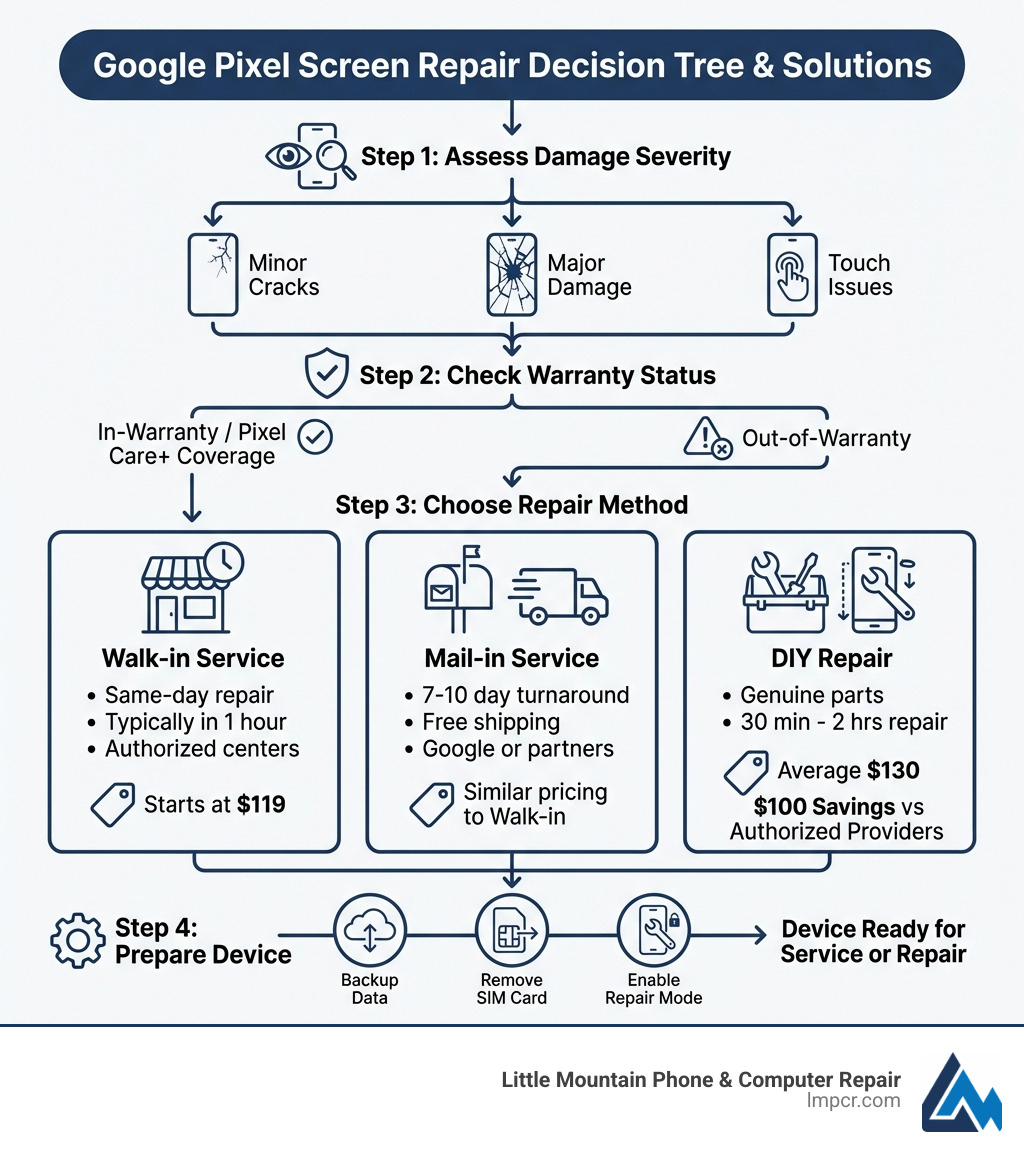
When your Google Pixel’s screen takes a tumble, you’re likely wondering about the quickest and most reliable path to getting it fixed. For most of us in the Painesville, Ohio, area, professional repair services offer peace of mind and often a surprisingly swift return to full functionality. At Little Mountain Phone & Computer Repair, we specialize in providing comprehensive and efficient solutions for all your Smartphone Repair needs, including those pesky Pixel screens.
Professional repair centers, like ours, offer distinct advantages over attempting a DIY fix, especially if you’re short on time or lack the technical expertise. We ensure that your device is handled by experienced technicians who are familiar with the intricacies of Google Pixel devices. Our goal is always to get your phone back into your hands as quickly as possible, often within an hour, so you can get back to your busy life.
Choosing between a walk-in and a mail-in service largely depends on your urgency and convenience preferences. Both have their merits, and we strive to offer flexible options to suit our community in Lake County, Ohio.
Walk-in Repairs: This is often the preferred choice for immediate solutions. When you visit our locations in Painesville, Mentor, Chardon, or any of our other service areas, you benefit from our commitment to quick service. The majority of our Google Pixel repairs, including screen replacements, are completed in 1 hour or less. We understand that your phone is an essential tool, and we work diligently to minimize your downtime. Our local expert technicians are on-site, ready to diagnose the issue and perform the necessary repairs with precision. This means you can drop off your device, perhaps grab a coffee, and pick it up fully functional shortly after.
Mail-in Repairs: While we pride ourselves on our convenient walk-in service, mail-in options are also available through Google’s official channels and other authorized partners for those who might not be able to visit a physical location. These services typically involve a total turnaround time of no longer than 7-10 days, including shipping both ways, which is often fast and free. While this can be a good option for some, for our local customers, our walk-in service usually proves to be much faster. If you’re considering a mail-in repair through Google, you can Learn about the mail-in repair process directly from them. However, for those in Painesville, Concord Township, Perry, Madison, Leroy Township, Fairport Harbor, Grand River, Mentor, Mentor-on-the-Lake, Kirtland, Kirtland Hills, Chardon, Aquilla, Eastlake, Willowick, Wickliffe, Willoughby, Willoughby Hills, or Geneva, Ohio, our direct walk-in service offers unparalleled speed and personal touch.
Here’s a quick comparison of what we offer at Little Mountain Phone & Computer Repair for your Google Pixel screen repair needs:
| Feature | Little Mountain Phone & Computer Repair (Walk-in) | |
|---|---|---|
| Service Type | Walk-in | Mail-in |
| Location | Painesville, Ohio, and surrounding areas | Not available through our store. Google’s mail-in service is generally available. |
| Speed | Most repairs in 1 hour or less | Not available through our store. Google’s mail-in: 7-10 days total turnaround. |
| Convenience | Direct interaction with local expert technicians | Requires shipping, no direct interaction during repair |
| Parts | We use high-quality parts, including OEM for newer models where available | Google mail-in uses genuine parts |
| Cost | Screen repairs starting at $119 | Varies by issue and warranty status |
| Warranty | Service warranty provided on all repairs | Google mail-in provides warranty on repairs |
Understanding your warranty status is a critical first step before starting on any Google Pixel screen repair. Your Pixel device typically comes with a standard manufacturer’s warranty, which covers defects in materials or workmanship. However, accidental damage, such as a cracked screen, is generally not covered under this standard warranty.
To check your device’s warranty status, you can sign into your Google Account and visit the Google Store Repair center or the “Your devices” page. This will display your warranty status under each of your registered devices. Having your IMEI (International Mobile Equipment Identity) number handy is also crucial for verification. This unique identifier helps us, or any repair service, confirm your device’s model and warranty eligibility.
For those who planned ahead (or for future Pixel purchases), Google offers Pixel Care+ (sometimes referred to as Preferred Care). This extended coverage plan provides accidental damage protection, often including unlimited claims for drops, spills, and yes, even shattered screens. If you have Pixel Care+, your Google Pixel screen repair would likely be covered, significantly reducing your out-of-pocket costs. Preferred Care must typically be added within 30 days of device purchase.
At Little Mountain Phone & Computer Repair, we stand behind our work with a service warranty on all repairs. We use high-quality replacement parts, and for Pixel 6 models and newer, we strive to use OEM (Original Equipment Manufacturer) parts whenever possible to ensure your device performs as it should. We believe in transparency and quality, ensuring that your repair is not just fast, but also reliable.
For the adventurous and technically inclined, performing a Google Pixel screen repair yourself can be an appealing option. It promises significant cost savings and the satisfaction of fixing your own device. However, it’s not a path for the faint of heart or those without a steady hand and patience. We’ve seen many folks in the Painesville area attempt DIY repairs only to bring their device to us in a worse state, so understanding the nuances is key.
The world of DIY repair has grown, with resources like iFixit leading the charge. They offer comprehensive “Screen Fix Kits” that include genuine, OEM parts for Pixel 2 and all later models, along with the necessary tools and step-by-step repair guides.
According to iFixit, the average cost of their Google Pixel screen fix kits is around $130. For older models, like the Pixel 4 and earlier, using one of these kits can result in significant savings—close to $100 compared to what some authorized service providers might charge. This can be a substantial difference, making DIY an attractive financial choice for some.
However, it’s crucial to acknowledge the risks involved. While the kits provide detailed instructions, the repair process generally involves delicate handling of adhesive, tiny screws, and fragile connectors. For certain models, like the Pixel 3, Pixel 3 XL, Pixel 4, and Pixel 4 XL, display repairs are noted as being more difficult because they require a complete disassembly of the device to access the screen. This increases the chance of accidentally damaging other components during the process.
We often get customers asking about repairing their Google Pixel 8 themselves. While kits are available, the newer models, with their advanced technology and tighter integrations, can be even more challenging for inexperienced hands. If you’re considering a DIY repair, you should be confident in your technical abilities and understand that you’re assuming the associated risks, including potentially voiding your device’s warranty or causing irreparable damage.
When it comes to the cost of a Google Pixel screen repair, there’s a range depending on the model, the extent of the damage, and whether you choose DIY or professional service.
For professional services, like ours at Little Mountain Phone & Computer Repair, screen repairs can start as low as $119. This benchmark is competitive with national averages for authorized providers. We also offer a price match guarantee: if you find a local competitor’s regularly published price for the same repair, we’ll match it and take an additional $5 off. Our goal is to provide accessible and affordable repairs for our community in Lake County, Ohio. You can always visit our website to Select Model and get a more precise quote for your specific Pixel device.
For DIY repairs, as mentioned, the average cost for a screen fix kit is around $130. While this might seem like a straightforward saving, it doesn’t account for the value of your time, the potential for error, or the lack of a professional warranty on your work.
It’s also important to consider out-of-warranty fees. If your screen damage isn’t covered by Google’s standard warranty or Pixel Care+, you’ll be responsible for the full repair cost. Professional services will provide an upfront estimate after a diagnostic check, ensuring you know the cost before any work begins. Component availability can also influence pricing and repair times, especially for newer or less common Pixel models. We work hard to maintain a stock of common parts to ensure quick turnaround times.
Before your beloved Google Pixel goes in for its much-needed Google Pixel screen repair, whether you’re bringing it to us or attempting a DIY fix, there are a few crucial steps you should always take. These steps protect your personal data, prepare your device for service, and ensure a smoother repair process. Think of it as preparing your phone for a spa day, but with more tools and less cucumber.
Google provides a helpful Pre-repair checklist that we strongly echo for all our Cellphone Repair customers.
This is, without a doubt, the most important step. While we take every precaution to protect your data during a repair, unforeseen circumstances can occur. Always back up your phone’s data to a cloud service (like Google Drive or Google Photos) or to a computer. This ensures that your precious photos, contacts, documents, and app data are safe, even if your phone needs a factory reset or experiences a rare data loss during the repair process. Imagine losing all those adorable cat videos! No one wants that.
Before handing over your device or sending it away, remember to remove your SIM card. This small, but mighty, card contains your mobile number and can also store some contact information. It’s easy to overlook, but keeping it safe with you ensures your personal service isn’t interrupted and that you don’t lose it during transit or repair.
For many eligible Pixel phones, Google has introduced a fantastic feature called Repair Mode. This is a game-changer for privacy during repairs. Traditionally, you’d be advised to perform a factory reset before sending your phone in for service to protect your personal data. While a factory reset erases all your data, Repair Mode allows technicians to access your device’s hardware and software for diagnostics and repairs without being able to see your personal information.
When you enable Repair Mode, your phone essentially boots into a clean, temporary operating environment. This means the technician can run diagnostics, test the new screen, and ensure everything is working perfectly, all while your photos, messages, and apps remain securely locked away. It’s a brilliant way to maintain your privacy without the hassle of backing up and then restoring your entire phone.
To enable Repair Mode, you typically go through your phone’s settings under System > Repair Mode. It’s an important step for protecting your data and streamlining the repair process, especially when sending your device for mail-in service or taking it to a professional. For more in-depth information, you can refer to the Pixel Diagnostic Tool user manual. This tool helps ensure that technicians can effectively diagnose and address issues, including those related to software calibration after a screen replacement, without compromising your privacy.
We know you’ve got questions, and we’re here to provide clear, straightforward answers. Here are some of the most common inquiries we receive regarding Google Pixel screen repair.
The speed of a Google Pixel screen repair largely depends on the service method you choose.
It’s worth noting that parts availability and the current workload at any repair center can occasionally impact repair times. However, our goal is always to provide the quickest service possible without compromising quality.
Yes, you can repair your Google Pixel screen yourself, but it comes with a significant asterisk. It’s primarily recommended for users with relevant technical experience and a good understanding of electronics.
Resources like iFixit provide comprehensive DIY kits that include genuine parts and detailed, step-by-step manuals for many Pixel models. These kits can lead to substantial cost savings, potentially around $100 compared to professional services.
However, there are several risks and considerations:
While DIY repair offers a sense of accomplishment and cost savings, we often advise caution. For most users in Painesville and surrounding areas, the peace of mind, speed, and warranty provided by professional services like Little Mountain Phone & Computer Repair outweigh the potential DIY headaches.
When it comes to your Google Pixel screen repair, knowing your warranty and protection options can save you a lot of stress and money.
Understanding these options helps you make an informed decision about how to approach your screen repair and how to protect your device going forward.
Navigating a cracked or malfunctioning Google Pixel screen can be frustrating, but as we’ve explored, you have several viable paths to getting your device back in working order. From swift professional repairs to cost-saving DIY options, the key is to choose the solution that best fits your technical comfort, budget, and time constraints.
For those in Painesville, Concord Township, Perry, Madison, Leroy Township, Fairport Harbor, Grand River, Mentor, Mentor-on-the-Lake, Kirtland, Kirtland Hills, Chardon, Aquilla, Eastlake, Willowick, Wickliffe, Willoughby, Willoughby Hills, or Geneva, Ohio, Little Mountain Phone & Computer Repair stands as your trusted local expert. With over 20 years of experience in device repair and a commitment to 30-minute average repair times, we offer a comprehensive, high-quality solution for your Google Pixel screen repair needs. Our expert technicians are ready to provide the fast, reliable service you deserve, getting you back to your digital life without unnecessary delays.
Don’t let a damaged screen slow you down. Reach out to us, your local experts, for an efficient and trustworthy Google Pixel screen repair solution.
For more information on our services, visit our Google Pixel screen repair page.

Need Help?
© Big Hill Technologies, LLC. All Rights Reserved
